
Cybersecurity has changed significantly over the past decade. Businesses no longer operate entirely from office buildings, store all their data on local servers, or rely on a single network to manage their daily operations. Today, employees work remotely, applications run in the cloud, and sensitive information moves between devices, platforms, and locations every day.
While these changes have made businesses more flexible, they have also created new security challenges. Traditional network defenses, such as firewalls and perimeter-based security systems, remain important, but they cannot protect every access point on their own.
A compromised employee account, an unsecured device, or an incorrectly configured cloud application can create opportunities for attackers to access business information.
This is where Zero Trust Security comes in.
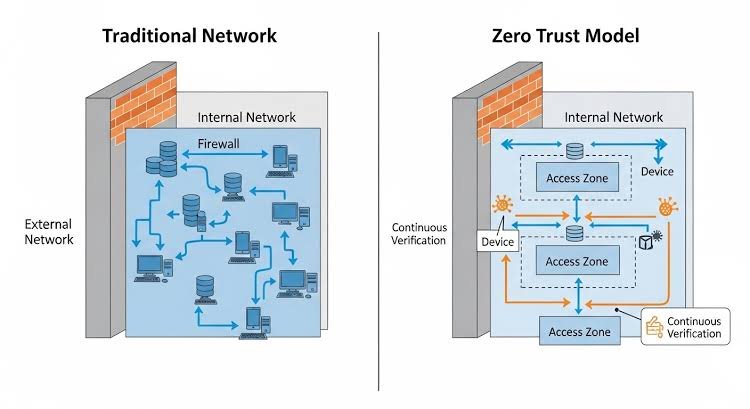
Zero Trust is a modern cybersecurity approach built around a simple principle: never automatically trust a user, device, or connection simply because it appears to be inside a trusted network. Every access request must be evaluated according to identity, permissions, device status, and other relevant security conditions.
Instead of relying exclusively on a strong network perimeter, Zero Trust focuses on protecting individual users, applications, systems, and data.
In this guide, we’ll explain what Zero Trust Security is, why traditional network defenses are no longer enough on their own, how Zero Trust works, and how businesses can implement this approach to strengthen their cybersecurity strategy in 2026.
What Is Zero Trust Security?
Zero Trust Security is a cybersecurity model that requires organizations to verify access requests rather than automatically trusting users or devices based on their network location.
The concept is formalized in the National Institute of Standards and Technology’s NIST Special Publication 800-207, which describes Zero Trust Architecture as an approach that shifts security away from static network boundaries and toward protecting individual resources. NIST Zero Trust Architecture
In a traditional environment, a user connected to the company network might receive broader access simply because they are considered to be inside the organization’s trusted perimeter.
Zero Trust takes a different approach. Even when an employee is connected to the corporate network, the system evaluates whether that person should access a particular application, database, or file.
For example, imagine an employee who needs to access a company’s project management software. A Zero Trust system may verify the employee’s identity, require multifactor authentication, check the device’s security status, and confirm that the employee has permission to use the application.
If the same account attempts to access a sensitive financial database without the necessary authorization, the request can be denied.
The objective is to ensure that users receive only the access they need and that access decisions are based on relevant security information.
Zero Trust does not mean trusting nobody under any circumstances. It means avoiding automatic trust and continuously managing access according to risk.
Why Traditional Network Defenses Are No Longer Enough
Traditional network security was designed around the idea that an organization could establish a trusted internal network and protect it from threats originating outside that boundary.
Firewalls, network segmentation, intrusion detection systems, and virtual private networks have played important roles in this model. They remain valuable security controls today.
The problem arises when businesses rely on perimeter defenses as their primary source of protection while their systems, employees, and data extend beyond that perimeter.
Several changes in modern business environments have made this approach less sufficient on its own.
1. Remote Work Has Changed the Security Landscape
Remote and hybrid work have become common operating models for many organizations.
Employees may access company resources from home networks, shared workspaces, hotels, or personal devices. These connections do not necessarily pass through the same security controls used inside a traditional corporate office.
A secure remote-access connection can protect traffic, but it does not automatically guarantee that the user’s account is legitimate or that the connected device is free from malware.
Zero Trust addresses this challenge by evaluating identity, device security, and access permissions rather than treating network connectivity as proof of trust.
2. Cloud Applications Exist Outside Traditional Network Boundaries
Businesses increasingly use cloud-based applications for customer management, accounting, file storage, collaboration, and business operations.
These services may be hosted by different providers and accessed directly through the internet.
As a result, protecting the office network alone cannot secure every application that employees use.
Zero Trust extends access controls to cloud services, applications, and data wherever they are hosted.
3. Stolen Credentials Can Bypass Perimeter Defenses
Cybercriminals frequently target user accounts through phishing, password theft, and other credential-compromise techniques.
If an attacker obtains valid login credentials, some traditional security controls may struggle to distinguish the attacker from the legitimate user.
Zero Trust can reduce this risk through multifactor authentication, device checks, contextual access policies, and monitoring for suspicious activity.
For instance, an account attempting to access a sensitive application from an unfamiliar device may be required to complete additional verification or may be blocked according to the organization’s security policy.
4. Insider Threats Require More Than Network Protection
Not every security risk originates outside a company.
An employee might accidentally share a confidential document, misuse authorized access, or fall victim to a compromised account. A contractor may also retain access to resources after their assignment ends if permissions are not properly reviewed.
Zero Trust encourages organizations to limit access according to job responsibilities and business needs.
This reduces unnecessary privileges and makes it easier to control who can access sensitive resources.
5. Connected Systems Increase the Potential Impact of an Attack
Modern business environments often connect multiple applications, databases, cloud services, and internal systems.
If an attacker compromises one system, poorly controlled connections may provide opportunities to reach other resources.
Zero Trust supports more granular access policies and network segmentation, helping limit unnecessary communication between systems.
The goal is to reduce the potential damage from a compromised account, device, or application.
How Does Zero Trust Security Work?
Zero Trust Security combines several technologies and policies to evaluate access requests and protect resources.
The precise implementation varies by organization, but the underlying approach is consistent: access should be explicitly authorized, limited to what is necessary, and evaluated using relevant security information.
1. Identity Verification
The first step is establishing who or what is requesting access.
Organizations use identity and access management systems to authenticate employees, contractors, administrators, applications, and other entities.
Common security measures include:
- Strong authentication requirements
- Multifactor authentication (MFA)
- Single sign-on (SSO)
- Centralized identity management
- Automated account provisioning and removal
For example, an employee logging into a business application may need to provide a password and approve a second authentication factor.
Multifactor authentication helps reduce the risk associated with stolen passwords, although phishing-resistant authentication methods can provide additional protection.
2. Device Verification
Zero Trust does not evaluate user identity alone. It can also consider whether the device requesting access meets the organization’s security requirements.
A managed laptop may be checked for supported operating-system versions, required security updates, endpoint protection, and device-management compliance.
If a device fails an important security requirement, the organization may restrict access or require the problem to be resolved before granting access to sensitive resources.
Device verification is particularly useful for organizations that support remote work or allow employees to use multiple devices.
3. Least-Privilege Access
The principle of least privilege means giving users and systems only the permissions necessary to perform their assigned tasks.
For example, a marketing employee may need access to campaign analytics but not payroll records or production server administration.
Similarly, an application that reads customer information may not need permission to delete customer records.
Limiting privileges helps reduce the number of resources an attacker can reach if an account or application becomes compromised.
Organizations should also review permissions regularly and remove access that is no longer required.
4. Context-Aware Access Policies
Zero Trust systems can evaluate additional information when deciding whether to permit an access request.
Depending on the implementation, this may include:
- User identity and role
- Device security status
- Requested application or resource
- Location and network information
- Authentication strength
- Unusual access patterns
- Relevant threat intelligence
For example, a routine request to view a company calendar may require standard authentication, while an attempt to download sensitive customer records may trigger stronger verification or additional restrictions.
Context-aware policies allow businesses to apply security controls that reflect the sensitivity of the resource and the risk of the request.
5. Continuous Monitoring and Reassessment
Zero Trust is not simply a login procedure.
Organizations monitor relevant security events and may reassess access when a user’s risk level, device status, or session conditions change.
For example, if endpoint security detects malware on a company laptop, the organization may restrict access to sensitive systems until the device is investigated.
The exact frequency of reassessment depends on the system and its capabilities. Zero Trust does not necessarily require every user to repeat multifactor authentication for every action.
Instead, it aims to make access decisions appropriately responsive to risk.
6. Network Segmentation
Network segmentation divides an environment into smaller areas with controlled communication between them.
Zero Trust can use segmentation to restrict how applications, workloads, and devices communicate.
For example, a system hosting customer-facing services may be permitted to communicate with a specific database through approved connections, while access to unrelated internal systems remains blocked.
This helps limit lateral movement, which occurs when an attacker attempts to move from one compromised system to another.
7. Data Protection
Protecting access to applications is only part of the security strategy. Organizations must also protect the information those applications contain.
Zero Trust programs may include data classification, encryption, access restrictions, data loss prevention, and monitoring of sensitive information.
A confidential document, for example, may be accessible only to specific employees and protected by additional restrictions when downloaded or shared.
These measures help ensure that data remains protected even when it moves between cloud services, devices, and business applications.
Traditional Security vs. Zero Trust Security
Traditional network security and Zero Trust are not mutually exclusive. Many organizations use firewalls, intrusion detection, endpoint protection, and other conventional controls as part of a broader Zero Trust strategy.
The key difference is where trust is assumed and how access decisions are made.
| Feature | Traditional Perimeter-Based Security | Zero Trust Security |
|---|---|---|
| Main focus | Protecting network boundaries | Protecting users, devices, applications, and data |
| Trust model | May rely more heavily on internal network location | Does not grant implicit trust based on network location |
| Access control | Often based on network and account permissions | Uses granular policies informed by identity, device, and context |
| User verification | May focus heavily on initial access | Evaluates access requests and relevant risk conditions |
| Internal traffic | May allow broad access within trusted network segments | Uses explicit permissions and segmentation to restrict access |
| Remote work | Often relies on secure remote-access connections | Applies access policies to remote and on-premises resources |
| Monitoring | Focuses on network and system events | Combines identity, device, application, and other security signals |
| Security objective | Prevent unauthorized entry and detect threats | Prevent unauthorized access and limit the impact of compromise |
Traditional defenses are still important. A firewall can block unwanted traffic, and endpoint protection can detect malicious software.
Zero Trust complements these controls by reducing the assumption that a connection or account is trustworthy simply because it has passed an earlier security check.
Core Principles of Zero Trust Architecture
A successful Zero Trust strategy involves more than purchasing a security product. It requires a consistent approach to identity, access, infrastructure, and data protection.
Verify Explicitly
Access decisions should use available information about the user, device, resource, and relevant security conditions.
This helps organizations avoid relying on passwords, network location, or previous access as the sole basis for trust.
Use Least-Privilege Access
Users and applications should receive only the permissions required for their work.
Organizations can support this principle through role-based access control, just-in-time administrative privileges, and regular permission reviews.
Assume Breach
Security teams should plan for the possibility that an account, device, or application could be compromised.
This means limiting unnecessary connections, monitoring suspicious activity, protecting sensitive data, and preparing to contain incidents.
These principles align with the broader approach described in NIST’s Zero Trust Architecture guidance. Read the NIST Zero Trust Architecture publication.
Key Technologies Used in Zero Trust Security
Zero Trust relies on multiple technologies working together. No single product provides a complete Zero Trust architecture for every business.
Identity and Access Management (IAM)
IAM platforms manage digital identities, authentication, and permissions.
They help businesses determine who can access particular applications and resources.
Multifactor Authentication (MFA)
MFA requires users to verify their identity using more than one authentication factor.
It adds protection when passwords are compromised and is a foundational control for many Zero Trust programs.
Endpoint Detection and Response (EDR)
EDR tools monitor endpoints, such as laptops and servers, for suspicious activity.
Their security signals can help organizations identify compromised devices and respond to potential threats.
Zero Trust Network Access (ZTNA)
ZTNA solutions provide controlled access to specific applications or resources based on configured identity and security policies.
Unlike broad network access, ZTNA can limit a user to the applications they are authorized to use.
It is often considered an alternative to, or a complement for, traditional remote-access VPN arrangements, depending on business requirements.
Security Information and Event Management (SIEM)
SIEM platforms collect and analyze security events from multiple systems.
They can help security teams investigate suspicious activity, identify patterns, and coordinate incident response.
Data Loss Prevention (DLP)
DLP tools help organizations detect or restrict unauthorized movement of sensitive information.
They may monitor activities such as file transfers, email attachments, and uploads to external services.
Cloud Security Tools
Cloud security technologies help identify misconfigurations, monitor cloud workloads, and protect applications and data hosted by cloud providers.
These capabilities can support Zero Trust by extending security visibility beyond traditional corporate networks.
Benefits of Zero Trust Security for Businesses
Zero Trust can provide practical security and operational benefits when it is implemented according to an organization’s risks and requirements.
1. Reduced Risk of Unauthorized Access
By requiring appropriate authentication and authorization, Zero Trust helps reduce opportunities for unauthorized users to access business resources.
Multifactor authentication and granular permissions are especially useful when accounts are targeted by phishing or credential theft.
2. Better Protection for Remote and Hybrid Teams
Zero Trust allows businesses to apply consistent access policies to employees working from different locations.
Rather than depending entirely on the security of a particular network, organizations can evaluate the identity, device, and access request.
This can support flexible work arrangements without abandoning security controls.
3. Reduced Lateral Movement
If an attacker compromises one account or system, segmentation and least-privilege permissions can limit the resources available to that attacker.
This does not eliminate the possibility of an attack spreading, but it can reduce unnecessary paths between systems.
4. Improved Visibility
A Zero Trust implementation can bring together information from identity systems, endpoint security, applications, and network monitoring.
This broader view can help security teams understand access patterns and investigate suspicious behavior more effectively.
The level of visibility depends on the tools deployed and how well they are integrated.
5. Stronger Control Over Sensitive Data
Granular permissions and data protection policies help organizations control access to confidential information.
Businesses can apply different levels of protection to ordinary business documents, financial records, customer information, and other sensitive assets.
6. Support for Cloud and Hybrid Environments
Zero Trust principles can be applied across cloud services, company-managed infrastructure, and hybrid environments.
This makes the approach useful for businesses that rely on several applications and infrastructure providers.
7. More Structured Access Management
Zero Trust encourages businesses to document access policies, assign ownership, review permissions, and establish consistent authentication requirements.
These practices can improve security governance and make it easier to understand who has access to important resources.
How to Implement Zero Trust Security: A Step-by-Step Guide
Moving to Zero Trust is a process rather than a one-time installation. Businesses should introduce changes gradually, prioritize high-risk areas, and monitor the results.
The Cybersecurity and Infrastructure Security Agency (CISA) provides a Zero Trust Maturity Model that organizations can use as a reference when developing their implementation plans. Although designed for federal agencies, its concepts can inform planning in other organizations. Read CISA’s Zero Trust Maturity Model.
Step 1: Identify Critical Assets
Begin by identifying the systems and information that matter most to your business.
These may include customer databases, financial applications, intellectual property, employee records, cloud storage, and production systems.
Document where these assets are located, who uses them, and which applications or services need to communicate with them.
This inventory provides a foundation for deciding where stronger controls are needed.
Step 2: Review User Identities and Permissions
Examine employee accounts, administrator privileges, service accounts, contractors, and other identities.
Look for inactive accounts, excessive permissions, shared credentials, and accounts that no longer have a valid business purpose.
Remove unnecessary access and establish clear procedures for creating, changing, and disabling accounts.
Step 3: Strengthen Authentication
Enable multifactor authentication for business applications, especially email, administrative systems, remote access, and services containing sensitive data.
Where practical, prioritize phishing-resistant authentication methods, such as passkeys or appropriately configured security keys.
Use single sign-on where it supports centralized access management, while ensuring that the identity system itself is strongly protected.
Step 4: Assess Device Security
Determine which devices can access company resources and what security requirements they must meet.
These requirements might include supported operating systems, current security patches, endpoint protection, device encryption, and centralized management.
Create policies for devices that do not meet the required standards.
Step 5: Apply Least-Privilege Access
Review permissions for applications, databases, cloud services, and internal systems.
Ensure that employees can access the information required for their responsibilities without receiving unnecessary privileges.
For administrative tasks, consider just-in-time access that grants elevated permissions only when needed and for an appropriate period.
Step 6: Introduce Granular Access Controls
Start by protecting a high-value application or sensitive resource.
Configure policies that evaluate identity, device status, and the requirements of the requested resource.
Test these policies with a small group before expanding them across the organization.
This gradual approach helps identify compatibility problems and reduces the risk of disrupting essential business operations.
Step 7: Segment Networks and Workloads
Identify systems that should not communicate freely with one another.
Use network controls and workload-level policies to restrict connections to approved destinations and services.
Apply segmentation carefully, testing legitimate application dependencies before blocking existing traffic.
Step 8: Centralize Monitoring
Collect relevant security information from identity providers, endpoints, applications, cloud environments, and network controls.
Define alerts for suspicious logins, unusual privilege changes, unexpected data transfers, and other events that may indicate a security incident.
Establish clear procedures for investigating alerts and responding to confirmed threats.
Step 9: Test and Improve Continuously
Review access policies, incident records, authentication failures, and device compliance over time.
Test recovery procedures and confirm that access can be revoked promptly when an account or device is compromised.
Use the findings to improve policies and expand Zero Trust capabilities in stages.
Common Zero Trust Security Challenges
Although Zero Trust can strengthen security, implementation requires careful planning.
Legacy Systems
Older applications may not support modern authentication methods, centralized identity management, or granular access controls.
Businesses may need gateways, additional access controls, application updates, or a longer-term replacement plan.
Implementation Costs
Zero Trust may require investment in identity management, endpoint protection, monitoring, integration, training, and specialist expertise.
Costs depend on the organization’s existing technology and the scope of the implementation.
A phased approach can help prioritize the controls that address the most significant risks first.
Complex IT Environments
Organizations often use a mixture of cloud applications, legacy systems, remote devices, and third-party services.
Applying consistent policies across these environments can be difficult, especially when security information is spread across separate tools.
A clear architecture and documented responsibilities can help reduce this complexity.
Employee Experience
Additional authentication steps and restrictive access policies can frustrate employees if they are poorly designed.
Businesses should balance security with usability by applying proportionate controls, using single sign-on where appropriate, and making access requirements clear.
False Positives and Access Disruptions
Automated security policies may occasionally block legitimate users or flag normal activity as suspicious.
Testing, monitoring, and carefully defined exceptions can help address these problems without creating broad security gaps.
Skills and Training
Zero Trust often requires collaboration between IT, security, application owners, and business teams.
Employees need to understand authentication requirements, device policies, and appropriate data handling. Technical teams need the skills to manage policies, investigate alerts, and maintain integrations.
Common Zero Trust Security Mistakes to Avoid
Businesses can undermine their security strategy if they treat Zero Trust as a product purchase instead of an ongoing program.
Avoid these common mistakes:
- Assuming MFA is enough: MFA is important, but it does not replace authorization controls, endpoint security, monitoring, or data protection.
- Trusting every internal connection: Devices and systems inside a company network should not automatically receive broad access.
- Giving users excessive permissions: Access should reflect actual job responsibilities and business needs.
- Ignoring service accounts: Automated systems and applications also require managed identities, protected credentials, and appropriate permissions.
- Making changes without testing: Restrictive policies can interrupt business-critical workflows if application dependencies are not understood.
- Neglecting monitoring: Access controls cannot provide their full value if suspicious activity goes unnoticed.
- Trying to transform everything at once: A phased approach is usually easier to manage, test, and improve.
Zero Trust Security and AI: What Businesses Should Know
Artificial intelligence is becoming part of both cybersecurity operations and business workflows. AI-powered tools can help security teams analyze events, identify patterns, and investigate unusual activity.
In a Zero Trust environment, these capabilities may help teams prioritize suspicious access attempts or correlate signals from different security systems.
For example, a security platform may identify an unusual login combined with a device security alert and recommend further investigation.
However, AI should support—not replace—well-defined security policies and accountable decision-making.
AI systems can produce false positives, miss threats, or generate inaccurate conclusions. Businesses should establish appropriate human oversight, protect the data used by security tools, and carefully test automated responses before allowing them to block users or modify critical systems.
Zero Trust principles are also relevant to AI agents that access business applications. Each agent should have a managed identity, clearly defined permissions, and access limited to the tasks it is authorized to perform.
As AI adoption grows, managing the identities and privileges of both human users and automated systems will become an increasingly important part of business security.
Is Zero Trust Security Suitable for Small Businesses?
Yes. Small businesses can benefit from Zero Trust principles without deploying a complex enterprise security architecture immediately.
The most practical approach is to begin with basic controls that address common risks.
For example, a small business can:
- Enable multifactor authentication for email and critical applications.
- Use a password manager and remove shared credentials where possible.
- Limit administrator privileges.
- Keep devices updated and protected.
- Disable accounts promptly when employees leave.
- Review access to cloud storage and customer information.
- Maintain tested backups and a basic incident response plan.
These measures do not constitute a complete Zero Trust architecture by themselves, but they provide a useful foundation.
As the business grows, it can introduce centralized identity management, device compliance policies, granular application access, and more advanced monitoring.
The goal is to improve security in manageable stages rather than adopting every available technology at once.
Frequently Asked Questions About Zero Trust Security
What is Zero Trust Security in simple terms?
Zero Trust Security is a cybersecurity approach that requires access requests to be verified instead of automatically trusting users or devices based on their network location.
It uses identity verification, access permissions, device security, and other relevant information to help protect applications and data.
Why is Zero Trust better suited to modern business environments?
Modern businesses use cloud applications, remote devices, external services, and distributed workforces. These resources often extend beyond a traditional corporate network.
Zero Trust applies access controls to individual resources, helping organizations protect systems regardless of where users or applications are located.
What are the three main principles of Zero Trust?
The three commonly cited principles are to verify explicitly, use least-privilege access, and assume breach.
Together, they encourage organizations to evaluate access requests carefully, restrict unnecessary permissions, and plan for the possibility that a security control may fail.
Does Zero Trust replace firewalls?
No. Firewalls remain useful for controlling network traffic and blocking unauthorized connections.
Zero Trust complements firewalls by adding identity-based authorization, granular access policies, device checks, and other controls that help protect individual resources.
What is the difference between Zero Trust and a VPN?
A traditional VPN typically establishes an encrypted connection between a user or device and a network. Depending on its configuration, it may provide access to multiple internal resources.
Zero Trust Network Access generally focuses on granting controlled access to specific applications or resources according to identity and policy.
A VPN can still be appropriate for certain use cases, and the two technologies may coexist.
What technologies are required for Zero Trust?
The technology depends on the organization’s requirements, but common components include identity and access management, multifactor authentication, endpoint security, network segmentation, monitoring, and data protection.
Some organizations also use Zero Trust Network Access solutions and centralized security analytics.
How long does it take to implement Zero Trust?
Implementation time varies based on the size of the organization, its existing systems, technical capabilities, and security requirements.
Some foundational improvements can be introduced relatively quickly, while a broad enterprise implementation may take considerably longer.
Organizations should prioritize high-risk resources, implement changes in phases, and measure progress over time.
Is Zero Trust Security expensive?
Costs vary according to the technologies already in place and the level of protection required.
Businesses may be able to begin with existing identity and device-management capabilities, while more complex environments may require additional software, integration, and specialist support.
A risk-based implementation plan can help direct resources toward the most important security gaps.
Does Zero Trust prevent all cyberattacks?
No security model can eliminate every cyber risk.
Zero Trust can reduce opportunities for unauthorized access and help limit the impact of compromised accounts or systems. However, it must be combined with appropriate monitoring, vulnerability management, backups, incident response, and employee awareness.
What is Zero Trust Architecture?
Zero Trust Architecture is the design of systems, policies, and technologies that apply Zero Trust principles across an organization’s digital environment.
It defines how access requests are evaluated, how permissions are enforced, and how resources are protected. NIST SP 800-207 provides a formal framework for understanding this architecture.
Conclusion: Why Zero Trust Security Matters for the Future
Traditional network defenses remain an essential part of cybersecurity, but they are no longer sufficient as the sole basis for protecting modern business environments.
Cloud applications, remote employees, connected systems, and increasingly sophisticated attacks require organizations to think beyond the network perimeter.
Zero Trust Security offers a more resource-focused approach by verifying access requests, limiting permissions, monitoring security conditions, and preparing for the possibility of compromise.
For businesses, the transition does not have to happen overnight. Strengthening authentication, reviewing user permissions, securing devices, protecting sensitive data, and improving monitoring are practical places to begin.
The most successful Zero Trust programs are built around real business risks rather than a particular product or technology trend. They combine suitable security tools with clear policies, ongoing evaluation, and cooperation across the organization.
As businesses continue to adopt cloud services, AI-powered applications, and flexible working arrangements, controlling access to digital resources will remain a central part of cybersecurity.
Ultimately, Zero Trust Security is about replacing automatic trust with informed, controlled access—helping businesses protect their data, reduce unnecessary exposure, and build a stronger security foundation for the future.