
Imagine arriving at work one morning only to discover that your business files are inaccessible, customer records have disappeared, and a message on your screen demands payment to restore access. Your team cannot access essential applications, daily operations come to a halt, and every minute of downtime creates additional pressure.
This is the reality of a ransomware attack.
Ransomware has become one of the most disruptive cybersecurity threats facing businesses, government organizations, and individuals. These attacks can lock important files, interrupt business operations, expose confidential information, and create significant financial losses. In some cases, attackers threaten to publish stolen data even if the victim has reliable backups.
As organizations increasingly depend on cloud platforms, remote access, digital payment systems, and connected business applications, protecting data has become more important than ever.
The good news is that businesses can reduce ransomware risk through a combination of preventive security controls, reliable backups, employee training, and a well-prepared incident response plan.
In this guide, we’ll explore the most effective ransomware defense strategies, explain how ransomware attacks happen, and outline practical steps organizations can take to protect their data from digital extortion in 2026.
What Is Ransomware?
Ransomware is a type of malicious software that prevents victims from accessing their data or systems, often by encrypting files or disrupting access to important resources. Attackers then demand payment, usually in exchange for a promised decryption key or another form of assistance.
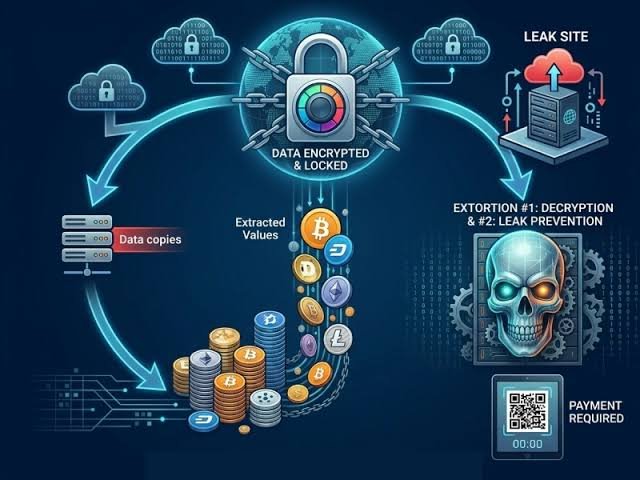
Modern ransomware incidents can involve more than file encryption. Attackers may first steal confidential information and then threaten to publish it, contact customers, or disclose sensitive business records unless the victim pays.
This tactic is commonly known as double extortion.
Some attacks also target a victim’s customers, suppliers, or business partners to increase pressure. As a result, the consequences can extend beyond the systems directly affected.
Ransomware can affect organizations of all sizes, including:
- Small businesses with limited cybersecurity resources
- Large enterprises with complex IT environments
- Healthcare organizations handling sensitive patient information
- Schools and universities managing student records
- Financial institutions processing confidential transactions
- Government agencies delivering essential public services
- Individuals storing personal files and documents
Ransomware does not always require sophisticated technology to succeed. Attackers may exploit unpatched software, stolen credentials, weak remote access controls, or employees who unknowingly open malicious attachments.
Understanding these entry points is the first step toward building an effective ransomware defense strategy.
How Do Ransomware Attacks Work?
Although ransomware campaigns vary, many follow a similar sequence. Understanding the process helps businesses identify opportunities to prevent an attack or limit its impact.
1. Initial Access
Attackers first gain access to a device, account, or network.
Common entry points include phishing emails, compromised passwords, exposed remote-access services, vulnerable software, and malicious downloads.
For example, an employee might receive an email that appears to contain an invoice. Opening an attachment or visiting a fraudulent website could expose the organization to malware or credential theft.
2. Establishing a Foothold
Once inside, attackers may attempt to maintain access to compromised systems.
They might exploit software vulnerabilities, misuse legitimate administrative tools, or create unauthorized accounts.
Strong endpoint protection, account monitoring, and timely security updates can help detect or prevent some of these activities.
3. Moving Through the Network
Some ransomware operators attempt to move from the initial compromised device to other systems.
They may search for administrator credentials, shared folders, business databases, and backup infrastructure.
This stage can be especially damaging when users have excessive permissions or when internal systems communicate without sufficient restrictions.
4. Stealing or Encrypting Data
Depending on the attack, criminals may copy sensitive information, encrypt files, disrupt applications, or combine these methods.
Stolen data can create additional risks because restoring encrypted files does not remove copies that attackers may already possess.
5. Demanding Payment
Finally, the attackers deliver a ransom message demanding payment to restore access, prevent publication of stolen information, or both.
There is no guarantee that paying will restore systems or stop data disclosure. Victims may receive an unusable decryption tool, face further demands, or discover that their data has already been shared.
The best strategy is to reduce the likelihood of a successful intrusion and prepare to recover without depending on the attacker.
Why Ransomware Defense Is Essential for Businesses
Ransomware can affect much more than a company’s IT systems. A successful attack may disrupt revenue, customer service, supply chains, and employee productivity.
Financial Losses
Businesses may face incident response expenses, system restoration costs, legal fees, regulatory obligations, and lost revenue during downtime.
Even organizations that recover their files without paying a ransom may experience significant recovery costs.
Operational Disruption
When critical systems become unavailable, employees may be unable to process orders, access customer information, manufacture products, or deliver services.
The longer essential systems remain offline, the greater the potential impact.
Data Exposure
Attackers may steal employee records, customer information, intellectual property, or confidential contracts before deploying ransomware.
This can create privacy concerns, legal obligations, reputational damage, and additional security risks.
Reputational Damage
Customers and business partners expect organizations to protect their information.
A ransomware incident can undermine trust, especially if confidential information is exposed or services remain unavailable for an extended period.
Regulatory and Legal Consequences
Depending on the industry and jurisdiction, organizations may need to investigate the incident, notify affected individuals or authorities, preserve evidence, and meet contractual or regulatory obligations.
These requirements vary, so businesses should involve appropriate legal and compliance professionals when responding to a serious incident.
12 Effective Ransomware Defense Strategies
An effective ransomware defense does not depend on a single antivirus application or security product. It combines multiple layers of protection so that if one control fails, others can help prevent the attack from spreading or reduce the resulting damage.
1. Maintain Reliable, Isolated Backups
Backups are among the most important defenses against ransomware-related data loss.
A reliable backup strategy allows organizations to restore important information without relying entirely on attackers to provide a decryption key.
However, simply making copies of files is not enough. Some ransomware operators deliberately search for and compromise accessible backups before encrypting production systems.
Businesses should follow the widely used 3-2-1 backup principle:
- Keep at least three copies of important data.
- Store copies on at least two different types of storage or media.
- Keep at least one copy off-site.
Organizations can strengthen this approach by maintaining offline or appropriately immutable backups that attackers cannot easily modify or delete.
Additional best practices include:
- Back up critical business systems and configurations, not just documents.
- Protect backup administration with strong authentication.
- Separate backup credentials from everyday user accounts.
- Monitor backup jobs for failures or unexpected changes.
- Test restoration procedures regularly.
- Define recovery time objectives (RTOs) and recovery point objectives (RPOs).
A backup that has never been tested may not work when it is needed most.
Practical tip: Schedule restoration exercises that simulate the loss of a critical system. Confirm that your team can retrieve clean data and bring essential services back online within acceptable time limits.
2. Train Employees to Recognize Phishing
Phishing remains a common way for attackers to obtain credentials or introduce malicious content into an organization.
A fraudulent email may imitate a trusted supplier, senior executive, delivery service, or software provider. The message might ask an employee to open an attachment, confirm account information, or approve an unexpected payment.
Employee awareness training can reduce the likelihood that these messages will succeed.
Teach employees to recognize warning signs such as:
- Unexpected attachments or download links
- Urgent requests for money or confidential information
- Unusual sender addresses
- Unexpected password reset requests
- Messages asking employees to bypass normal approval procedures
- Requests to enable macros or install unfamiliar software
Training should also explain how to report suspicious messages without fear of embarrassment or punishment.
Businesses can reinforce awareness through realistic simulations, regular reminders, and clear reporting procedures.
Importantly, employee training should complement technical email security controls rather than replace them.
3. Keep Operating Systems and Software Updated
Outdated software can contain security vulnerabilities that attackers exploit to gain access to devices and networks.
Operating systems, web browsers, VPN products, business applications, routers, and other internet-facing technologies should receive security updates according to a defined patch management process.
An effective process should include:
- Maintaining an inventory of hardware and software.
- Identifying known vulnerabilities and available patches.
- Prioritizing critical and actively exploited vulnerabilities.
- Testing updates where necessary.
- Applying patches promptly.
- Verifying that updates were installed successfully.
Organizations should pay particular attention to systems exposed to the internet because these may be reachable by attackers without an initial foothold inside the network.
Unsupported software should be upgraded, replaced, isolated, or protected through appropriate compensating controls.
4. Enable Multifactor Authentication
Stolen passwords can give attackers access to email accounts, remote-access systems, cloud applications, and administrative consoles.
Multifactor authentication (MFA) requires an additional verification factor beyond a password, making many account-compromise attempts more difficult.
Prioritize MFA for:
- Email and collaboration platforms
- VPN and remote-access services
- Cloud administration portals
- Backup systems
- Privileged accounts
- Financial and customer management applications
Where possible, use phishing-resistant authentication methods, such as properly configured passkeys or security keys.
MFA is not a complete solution on its own. Attackers may still exploit compromised sessions, social engineering, or poorly secured recovery processes. Organizations should combine MFA with least-privilege permissions, monitoring, and secure account recovery.
5. Apply the Principle of Least Privilege
The principle of least privilege means giving users and applications only the permissions they need to perform their assigned tasks.
If every employee has administrator access, a compromised account may have far more opportunities to damage systems.
Businesses should review permissions for employees, contractors, service accounts, and applications.
Useful measures include:
- Removing unnecessary administrator privileges.
- Using separate accounts for administrative work.
- Granting elevated access only when needed.
- Reviewing permissions when employees change roles.
- Disabling accounts promptly when access is no longer required.
- Restricting access to sensitive files and backup systems.
Least-privilege access can limit the number of systems a compromised account can reach and reduce the potential impact of ransomware.
6. Use Endpoint Detection and Response Tools
Traditional antivirus software can detect many known threats, but organizations may also need tools that monitor suspicious behavior across endpoints.
Endpoint detection and response (EDR) solutions can help security teams identify unusual activity, investigate threats, and respond to compromised devices.
Depending on the product and configuration, capabilities may include detecting suspicious file operations, identifying malicious processes, isolating an affected device, and collecting information for incident investigation.
For example, if a workstation begins performing unusual file modifications across shared folders, security tools may flag the behavior for investigation.
EDR should be supported by a clear response process. Alerts must be reviewed, incidents investigated, and affected devices isolated when appropriate.
Smaller businesses without dedicated security teams may consider a managed detection and response (MDR) service, provided it fits their requirements and budget.
7. Segment Your Network
Network segmentation divides an organization’s infrastructure into smaller areas with controlled connections between them.
Without appropriate segmentation, a compromised device may have unnecessary access to file servers, databases, backup systems, and other critical resources.
Businesses can reduce this risk by separating systems according to their function and sensitivity.
For example, employee workstations should not automatically have broad access to server administration interfaces or backup management systems.
Segmentation can also help isolate critical operational technology, guest networks, and systems containing sensitive information.
Before enforcing restrictive network rules, map legitimate application dependencies and test changes to avoid disrupting essential business operations.
8. Secure Remote Access and Cloud Accounts
Remote access technologies and cloud services can create valuable entry points if they are poorly configured or inadequately monitored.
Organizations should review remote access arrangements, including VPNs, remote desktop services, cloud administration tools, and third-party access.
Important measures include:
- Requiring strong authentication.
- Restricting access to authorized users and devices.
- Removing unused remote-access services.
- Updating remote-access software promptly.
- Limiting administrative access from ordinary user devices.
- Monitoring unusual sign-ins and privilege changes.
- Reviewing third-party access regularly.
Cloud applications also require careful configuration. Protect administrative accounts, review sharing permissions, and monitor changes to important storage and security settings.
Cloud storage should not automatically be treated as an independent backup. Synchronization can replicate accidental deletion or malicious changes, depending on the service and configuration.
9. Deploy Email and Web Security Controls
Email and web filtering can help block malicious attachments, suspicious links, fraudulent domains, and known malware.
Organizations should configure their email platforms to detect impersonation attempts and suspicious messages.
Domain authentication standards such as SPF, DKIM, and DMARC can also help reduce certain types of email spoofing when implemented correctly.
Web security controls may block access to known malicious websites or prevent downloads from risky sources.
These protections are not perfect. New threats and compromised legitimate websites may bypass filtering, so email and web controls should work alongside endpoint security and employee awareness.
10. Protect and Monitor Privileged Accounts
Administrator accounts can make high-impact changes to systems, users, and security settings.
If attackers compromise these accounts, they may be able to disable defenses, access sensitive data, or interfere with backups.
Businesses should maintain a limited number of privileged accounts and protect them with strong authentication.
Additional safeguards include:
- Using privileged access management where appropriate.
- Monitoring administrative activity.
- Restricting access to management interfaces.
- Avoiding routine email and web browsing from administrator accounts.
- Rotating or revoking exposed credentials promptly.
- Reviewing privileged permissions regularly.
Privileged accounts should receive stronger protection than ordinary user accounts because of the potential consequences of misuse.
11. Create a Ransomware Incident Response Plan
Preventive controls reduce risk, but no defense can guarantee that every attack will be stopped.
A written incident response plan helps employees understand what to do when ransomware is suspected.
The plan should identify:
- Who leads incident response.
- How employees report suspected incidents.
- Who has authority to isolate affected systems.
- How IT, security, legal, and management teams coordinate.
- How backups and recovery resources are protected.
- How evidence is preserved.
- When external incident response specialists should be contacted.
- How customers, regulators, and other parties will be notified when required.
Contact details should be available even if company email or internal systems become unavailable.
Organizations should rehearse the plan through tabletop exercises and recovery simulations. These exercises help identify missing responsibilities, unclear decisions, and technical dependencies before a real incident occurs.
12. Use Threat Monitoring and Vulnerability Management
Regular monitoring helps organizations identify suspicious behavior before it develops into a larger incident.
Security teams should review alerts from endpoint tools, identity systems, firewalls, cloud services, and other critical infrastructure.
They should also maintain a vulnerability management process to identify outdated software, exposed services, and insecure configurations.
Useful monitoring priorities include:
- Unexpected administrator account creation
- Unusual login patterns
- Attempts to disable security tools
- Unexpected changes to backup settings
- Large or unusual data transfers
- Suspicious access to multiple systems
- Unexpected changes to critical files
Monitoring becomes more effective when alerts are linked to a clear investigation and escalation process.
For smaller organizations, managed security services can provide additional monitoring capabilities when internal resources are limited.
Ransomware Prevention Checklist for Businesses
Use this checklist to review your current defenses and identify gaps that need attention.
{@body const tasks = [“Maintain tested, isolated backups of critical data”,”Enable MFA on email, remote access, cloud accounts, and administrator accounts”,”Patch operating systems and internet-facing software promptly”,”Remove unnecessary administrator privileges”,”Train employees to recognize and report phishing”,”Deploy endpoint protection and monitor security alerts”,”Segment critical systems and restrict unnecessary connections”,”Review cloud storage permissions and remote-access settings”,”Protect backup systems with separate credentials and access controls”,”Document and rehearse a ransomware incident response plan”,”Inventory critical systems and define recovery priorities”,”Review third-party access and software security requirements”]} {@body const [checkedTasks, setCheckedTasks] = DIL.useState([])} <box border radius=”lg” padding={4} gap={3}> <row align=”center” justify=”between”> <title size=”lg”>Security readiness checklist</title> <title size=”md” color=”secondary”>{checkedTasks.length}/{tasks.length}</title> </row> <box background=”surface-tertiary” radius=”full” height=”6px” clip> <box background=”surface-inverted” radius=”full” height=”6px” width={${checkedTasks.length/tasks.length*100}%}/> </box> {#each tasks as task} <checkbox key={task} checked={checkedTasks.includes(task)} onChange={v=>setCheckedTasks(old=>v?[…old,task]:old.filter(t=>t!==task))}>{task}</checkbox> {/each} <row> <button variant=”outline” color=”secondary” onClick={()=>setCheckedTasks([])}>Reset checklist</button> <button onClick={()=>GenUI.copy(tasks.map(t=>(checkedTasks.includes(t)?”[x] “:”[ ] “)+t).join(“\n”))}>Copy checklist</button> </row> </box>
This checklist is a starting point, not a guarantee of security. The controls you need depend on your organization’s size, industry, technology, and risk exposure.
What to Do During a Ransomware Attack
If ransomware is suspected, quick and coordinated action can help reduce further damage. Follow your incident response plan and prioritize safety, containment, and recovery.
Step 1: Isolate Affected Systems
Disconnect affected devices from wired and wireless networks when it is safe and practical to do so. This can help limit the spread of malicious activity.
Follow your organization’s response procedures, especially for servers and critical operational systems. Avoid making changes that could cause additional disruption without appropriate technical guidance.
Step 2: Notify the Incident Response Team
Contact your IT or security team using a communication method that is not dependent on potentially compromised systems.
If your organization has an incident response provider, contact them according to the established plan.
Small businesses without dedicated security staff may need to engage a qualified incident response specialist.
Step 3: Protect Backups and Critical Accounts
Prevent further unauthorized access to backup systems, administrative accounts, and other recovery resources.
Security teams should determine which credentials and systems may have been compromised and take appropriate containment measures.
Step 4: Preserve Evidence
Keep relevant ransom notes, suspicious emails, logs, security alerts, and other evidence.
Avoid deleting files or wiping affected devices before the incident response team has assessed the situation. Evidence may be needed to determine how the attack occurred and whether data was stolen.
Step 5: Investigate the Scope of the Incident
Determine which devices, accounts, applications, and data may be affected.
Investigators should assess whether the attack involved data theft, credential compromise, or access to backups and other critical systems.
Do not assume that a ransom note identifies the full scope of the incident.
Step 6: Restore Systems From Trusted Backups
Once the attack has been contained and the environment is considered safe, restore systems using verified clean backups.
Before reconnecting recovered systems, address the vulnerabilities or compromised credentials that allowed the attack to occur.
Restore critical services according to business priorities and test their integrity before returning them to normal operation.
Step 7: Assess Reporting and Notification Obligations
Depending on the information involved and the applicable laws or contracts, your organization may need to notify regulators, affected individuals, insurers, law enforcement, or business partners.
Seek legal and incident response guidance promptly.
Step 8: Review What Happened
After recovery, identify the initial access method, the controls that failed, and the changes needed to prevent a similar incident.
Update security policies, improve monitoring, test recovery procedures, and provide additional employee training where necessary.
Should you pay the ransom? Payment does not guarantee that files will be restored or stolen information kept private. It may also create legal, financial, and operational risks. Consult qualified incident response, legal, and relevant law enforcement professionals before making decisions about a ransom demand.
How Much Does Ransomware Protection Cost?
Ransomware protection costs vary considerably depending on the size of the organization, its existing infrastructure, and the level of security it requires.
A small business may be able to improve its defenses using built-in security features, strong authentication, reliable backups, timely updates, and employee training.
A larger organization may need dedicated security staff, enterprise endpoint protection, centralized monitoring, advanced identity controls, network segmentation, and external incident response support.
Common cost categories include:
| Security Measure | Main Cost Considerations |
|---|---|
| Backup and recovery | Storage, backup software, isolated copies, testing, and recovery infrastructure |
| Endpoint protection | Per-device or per-user licensing and management |
| Multifactor authentication | Identity platform licensing, hardware keys, and administration |
| Employee training | Training platforms, simulations, and staff time |
| Security monitoring | Software, internal analysts, or managed security services |
| Incident response | Planning, exercises, specialist retainers, and emergency support |
| Vulnerability management | Scanning tools, patching, and remediation work |
The goal is not necessarily to purchase the most expensive security products. It is to invest in controls that address the organization’s most important risks.
For many businesses, tested backups, strong authentication, timely patching, and restricted administrative access provide a valuable starting point.
Ransomware Defense for Small Businesses
Small businesses can be attractive targets because they often rely on digital systems but have limited resources for dedicated cybersecurity teams.
A practical defense strategy should focus first on reducing common points of failure.
Start With Essential Controls
Prioritize reliable backups, MFA, software updates, endpoint protection, and restricted administrator access.
These controls can reduce several important ransomware risks without requiring a complex security architecture.
Secure Business Email
Use available email security features, train employees to recognize suspicious requests, and establish verification procedures for payments or changes to supplier bank details.
Employees should have a simple way to report suspicious messages.
Protect Customer and Financial Data
Limit access to sensitive records, review cloud sharing settings, and avoid storing unnecessary information.
If customer or payment data is involved, follow applicable industry requirements and contractual obligations.
Prepare for Downtime
Document how your business would continue essential operations if email, accounting, or file storage became unavailable.
Identify critical contacts, backup communication methods, and the systems that must be restored first.
Get Expert Support When Needed
Managed security providers and qualified IT specialists can help smaller organizations configure controls, monitor threats, and prepare incident response procedures.
Before choosing a provider, understand its responsibilities, service coverage, response times, and recovery capabilities.
The Role of AI in Ransomware Defense
Artificial intelligence is becoming an increasingly useful component of cybersecurity operations.
AI-powered security tools can analyze large volumes of events, identify unusual patterns, and help analysts prioritize suspicious activity.
For example, behavioral analytics may flag a user account that suddenly accesses unusual systems or a device that begins performing abnormal file operations.
These signals can help security teams investigate potential threats more quickly.
However, AI is not a complete ransomware defense. Automated systems can produce false alerts, overlook new threats, or misinterpret legitimate activity.
Organizations should combine AI-powered tools with established security controls, reliable backups, vulnerability management, and trained incident responders.
Businesses should also secure the AI systems themselves, including their accounts, connected applications, data access, and administrative permissions.
The most effective approach uses AI to improve detection and response while maintaining human oversight for important security decisions.
Ransomware Defense Trends to Watch in 2026
The ransomware threat landscape continues to evolve, making it important for businesses to review their security strategies regularly.
More Focus on Data Theft
Ransomware incidents may involve data theft even when file encryption is limited or absent.
Organizations should therefore combine recovery planning with data protection, access monitoring, and procedures for investigating possible information exposure.
Identity-Based Attacks
Compromised credentials can provide access to business systems without requiring attackers to exploit a software vulnerability directly.
Strong authentication, privileged access management, and monitoring of suspicious sign-ins remain important defensive measures.
Cloud and Backup Security
Cloud services and backup platforms are critical to business continuity.
Organizations should protect administrative access, review sharing permissions, and ensure that recovery copies cannot be easily altered by compromised production accounts.
Managed Detection and Response
Businesses with limited internal security resources may use managed services to improve monitoring and incident response.
The value of these services depends on their coverage, response procedures, expertise, and ability to coordinate with the organization’s IT team.
Recovery Planning as a Security Priority
Preventing every attack is unrealistic. Businesses are increasingly better served by combining preventive controls with tested recovery procedures and clearly defined incident response responsibilities.
A strong recovery plan can help reduce the operational consequences of an incident even when prevention fails.
Frequently Asked Questions About Ransomware Defense
What is the best defense against ransomware?
There is no single control that prevents every ransomware attack. A strong defense combines tested backups, multifactor authentication, timely software updates, endpoint protection, least-privilege access, employee training, and a documented incident response plan.
Can ransomware infect cloud storage?
Yes. Cloud-stored files can be affected when attackers compromise a user’s account, misuse synchronization features, or obtain permissions to modify or delete data. Cloud providers may offer version history and recovery features, but businesses should verify their capabilities and maintain appropriate independent backups.
Are backups enough to protect against ransomware?
Backups are essential for recovery, but they do not prevent an attack or guarantee that stolen data will remain private. Attackers may also target backup systems. Organizations should maintain isolated or immutable recovery copies, protect backup credentials, test restoration, and implement preventive security controls.
Should businesses pay a ransomware demand?
Payment does not guarantee recovery or prevent the disclosure of stolen information. It can also introduce legal and financial risks. Businesses should consult qualified incident response and legal professionals, consider applicable sanctions and reporting requirements, and coordinate with appropriate authorities.
How can employees help prevent ransomware attacks?
Employees can reduce risk by identifying suspicious messages, avoiding unverified downloads, using approved authentication methods, following data handling policies, and reporting unusual activity quickly. Training should be supported by technical security controls.
Does antivirus software stop ransomware?
Antivirus software can detect and block many threats, but it cannot guarantee protection against every attack. Businesses should use layered security that includes endpoint monitoring, access controls, patch management, backups, and incident response planning.
How often should businesses back up their data?
Backup frequency should reflect how much data the business can afford to lose and how quickly systems need to recover. Organizations should define recovery point objectives and recovery time objectives, then configure and test backups to meet those requirements.
What is the difference between ransomware prevention and ransomware recovery?
Prevention focuses on reducing the chance of an attack through security controls such as MFA, patching, and endpoint protection. Recovery focuses on restoring systems and data after an incident through tested backups, incident response procedures, and validated system restoration.
Can small businesses afford ransomware protection?
Many important controls are accessible to small businesses, including software updates, MFA, restricted permissions, employee training, and properly configured backups. More advanced monitoring or incident response services can be added according to risk and budget.
How long does it take to recover from a ransomware attack?
Recovery time depends on the number of affected systems, the extent of data loss, the availability of clean backups, and whether attackers also stole information or compromised credentials. Organizations with tested recovery procedures and clear priorities are generally better prepared to restore essential services.
Conclusion: Build a Stronger Defense Against Ransomware
Ransomware is more than a technical problem. It can interrupt business operations, expose confidential information, damage customer trust, and create costly recovery challenges.
Protecting your organization requires a layered approach that combines prevention, detection, containment, and recovery.
Start with the essentials: maintain reliable backups, enable multifactor authentication, patch vulnerable software, limit user privileges, secure remote access, and teach employees how to recognize suspicious activity. Then strengthen these measures with network segmentation, endpoint monitoring, incident response planning, and regular recovery exercises.
No organization can eliminate every cybersecurity risk, but preparation can make a significant difference in how effectively it prevents and responds to an attack.
For businesses of every size, the most important step is to move beyond simply hoping an attack will not happen. Build a security strategy that assumes problems can occur, protects critical data, and gives your team a clear path to recovery.
Ultimately, effective ransomware defense is about more than blocking malicious software. It is about protecting business continuity, preserving customer trust, and ensuring your organization can recover when digital threats become reality.