
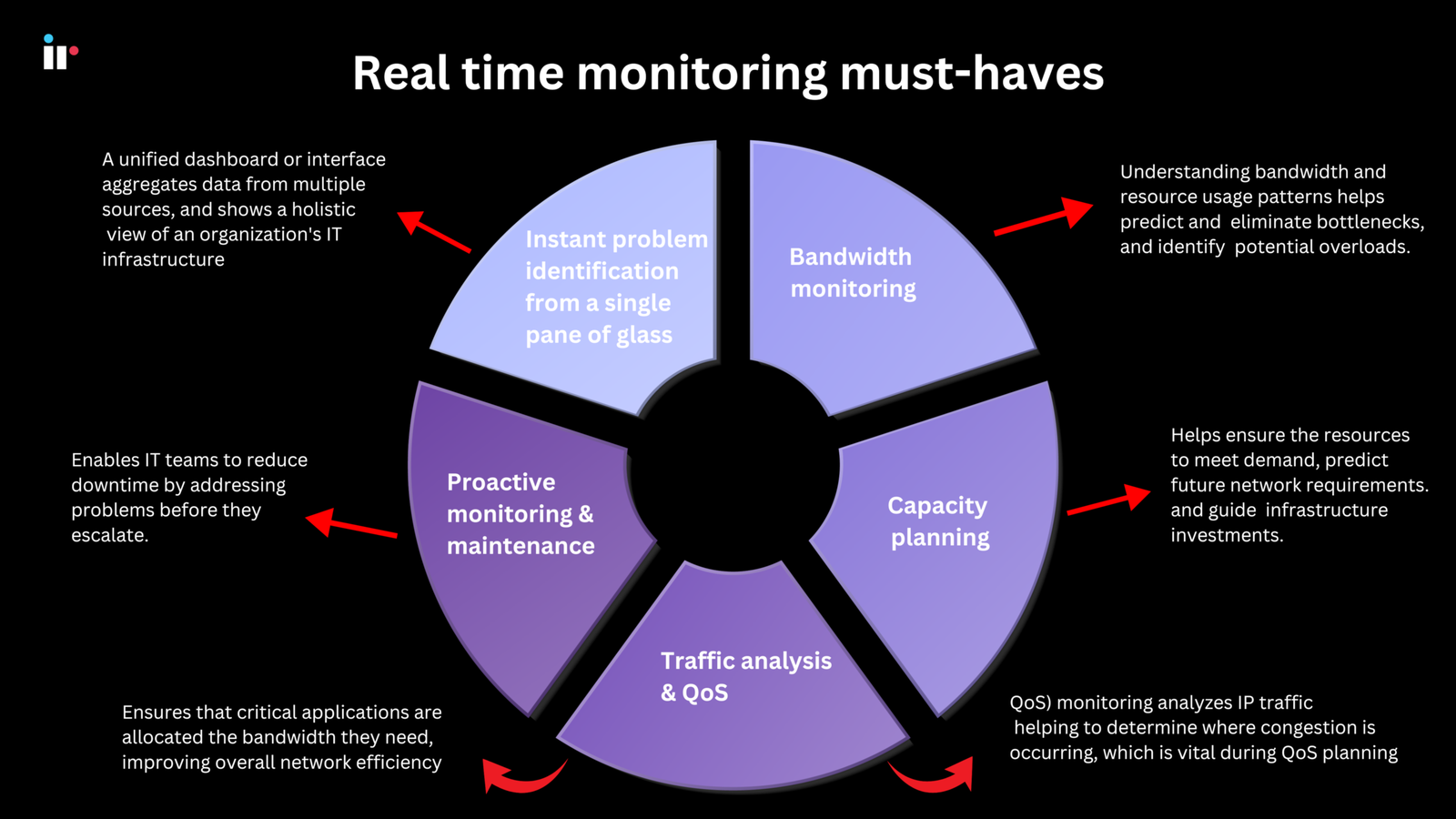
In today’s connected world, businesses depend heavily on computer networks to communicate, store information, access applications, and serve customers. When a network performs well, employees can work efficiently and customers can access services without unnecessary delays. However, even a small network problem can cause slow connections, application failures, security risks, and costly downtime. This is where Network Monitoring becomes important.
Network monitoring is the process of continuously observing a network to understand its performance, availability, traffic, and overall health. It helps IT teams identify unusual activity, discover technical problems, and respond to issues before they become major disruptions. Whether a company operates a small office network or a large cloud-based infrastructure, effective monitoring can make network management much easier.
What Is Network Monitoring?
Network monitoring is a systematic process used to track the performance and status of network devices, connections, applications, and services. Monitoring tools collect information from different parts of a network and present it to IT administrators through dashboards, reports, alerts, and other visual tools.
A typical monitoring system may keep an eye on routers, switches, firewalls, servers, wireless access points, bandwidth usage, and network connections. It can also monitor important performance indicators such as latency, packet loss, uptime, CPU usage, memory consumption, and traffic patterns.
The main purpose is not simply to collect data. The real goal is to use that information to identify problems quickly and maintain a stable, reliable, and secure network.
Why Is Network Monitoring Important?
Modern organizations cannot afford frequent network interruptions. Employees may depend on cloud applications, video conferencing, internal systems, email, and online databases throughout the working day. If the network becomes unavailable, productivity can drop almost immediately.
Network monitoring helps organizations understand what is happening across their infrastructure. Instead of waiting for employees to report that an application is slow or a website is unreachable, IT teams can receive alerts when something begins to go wrong.
For example, if bandwidth usage suddenly increases, monitoring software can help administrators investigate the cause. Similarly, if a server starts experiencing unusually high resource usage, the IT team can take action before the problem affects users.
Monitoring also provides historical information. This allows organizations to compare current performance with previous trends and identify recurring problems.
How Does Network Monitoring Work?
Network monitoring generally works by collecting performance and status information from devices and systems connected to a network.
Monitoring software communicates with network devices using different technologies and protocols. It gathers information such as device availability, traffic levels, interface status, errors, and resource consumption.
The collected information is then analyzed and displayed through a centralized dashboard. Administrators can configure specific thresholds for different metrics. When a metric crosses a defined limit, the system can generate an alert.
For instance, an administrator may configure an alert for unusually high bandwidth consumption. If network traffic reaches that threshold, the monitoring system can immediately notify the responsible team.
Some modern solutions also use automation and intelligent analytics to identify unusual patterns. This can make it easier to detect potential performance problems and security-related events.
Key Features of Network Monitoring
Different network monitoring solutions offer different capabilities, but several features are particularly useful.
Real-Time Monitoring
Real-time visibility allows IT teams to see the current condition of their network. Administrators can quickly identify devices that are offline, connections that are experiencing problems, or unusual changes in traffic.
Performance Tracking
Monitoring systems can track metrics such as latency, packet loss, bandwidth consumption, uptime, and response times. These measurements help teams understand whether the network is performing as expected.
Automated Alerts
Automated alerts are one of the most valuable features of network monitoring. Instead of manually checking every device, administrators can receive notifications when a predefined condition occurs.
Historical Reporting
Historical data makes it possible to analyze network performance over time. This can help identify trends, recurring failures, capacity problems, and areas that require improvement.
Device Monitoring
Network monitoring can cover a wide range of devices, including routers, switches, firewalls, servers, access points, and other infrastructure components.
Benefits of Network Monitoring
Implementing a reliable monitoring strategy can provide several important benefits.
Reduced Downtime
Early detection allows IT teams to address problems before they develop into serious outages. This can significantly reduce downtime and maintain business continuity.
Better Network Performance
By monitoring traffic and performance metrics, administrators can identify bottlenecks and optimize network resources. This can improve the experience of employees and customers.
Faster Troubleshooting
Without monitoring, troubleshooting can involve guessing and manually checking multiple systems. Monitoring data provides useful information about where and when a problem occurred, making diagnosis faster.
Improved Security Visibility
Although network monitoring and cybersecurity are not exactly the same thing, monitoring can provide valuable visibility into suspicious network behavior. Unexpected traffic patterns, unusual connections, or sudden changes in activity may indicate a potential security issue.
Better Resource Planning
Historical monitoring data can help organizations determine when they need additional bandwidth, upgraded hardware, or expanded infrastructure. This supports better long-term planning.
Network Monitoring and Network Security
Network performance and network security are closely connected. A network that is poorly monitored can make it harder to recognize unusual activity.
For example, an unexpected increase in outbound traffic could be caused by a legitimate business process, but it could also require investigation. Similarly, repeated connection attempts from unfamiliar sources may deserve attention.
Network monitoring tools can therefore complement security solutions by providing visibility into network behavior. However, organizations should not treat network monitoring as a replacement for dedicated security technologies such as firewalls, endpoint protection, intrusion detection systems, and security information and event management platforms.
A strong security strategy combines monitoring with appropriate preventive and protective controls.
Common Network Monitoring Metrics
Understanding the right metrics is essential for effective monitoring. Some of the most commonly observed measurements include:
Bandwidth Usage: Shows how much network capacity is being consumed. High usage can indicate heavy traffic or potential capacity limitations.
Latency: Measures the time required for data to travel between two points. High latency can affect applications, voice calls, gaming, and video conferencing.
Packet Loss: Indicates how many data packets fail to reach their destination. Significant packet loss can result in poor application performance and unstable connections.
Uptime: Measures how consistently devices and services remain available.
CPU and Memory Usage: Helps administrators determine whether network devices and servers have sufficient resources.
Error Rates: Network interface errors can indicate configuration problems, hardware issues, or other technical conditions that need investigation.
Challenges of Network Monitoring
Although network monitoring provides many benefits, it also comes with challenges.
One common challenge is the sheer amount of data generated by modern networks. Large organizations may have thousands of devices and connections, producing a huge volume of monitoring information. Without proper configuration, administrators can become overwhelmed by unnecessary alerts.
Another challenge is choosing the right monitoring solution. Different organizations have different requirements, so a tool that works well for one company may not be suitable for another.
Cloud environments can create additional complexity. Businesses may operate systems across multiple cloud providers, private infrastructure, remote offices, and traditional data centers. Monitoring all these environments from a unified perspective requires careful planning.
Organizations must also protect monitoring data because it may contain sensitive information about network infrastructure and activity.
Best Practices for Network Monitoring
To get the most value from network monitoring, organizations should follow a structured approach.
First, identify the most important devices, applications, and services that need monitoring. Not every metric needs the same level of attention.
Second, establish reasonable performance thresholds. Alerts should be meaningful rather than generated for every small variation.
Third, review monitoring data regularly. A monitoring system is most useful when teams actually analyze the information and use it to improve the network.
Fourth, maintain accurate documentation. Knowing how devices, applications, and connections relate to one another can make troubleshooting much easier.
Finally, regularly review the monitoring strategy as the organization grows. New cloud services, remote users, devices, and applications may require additional monitoring capabilities.
The Future of Network Monitoring
Network environments are becoming increasingly complex. Cloud computing, remote work, Internet of Things devices, virtualization, and distributed applications have changed the way organizations manage their infrastructure.
As a result, network monitoring is becoming more intelligent and automated. Modern solutions increasingly use analytics and machine learning techniques to identify unusual behavior, recognize performance patterns, and reduce unnecessary alerts.
Automation can also help IT teams respond to common problems more quickly. Instead of simply reporting an issue, some systems can support automated actions based on predefined rules.
However, technology does not eliminate the need for skilled IT professionals. Human expertise remains important for interpreting complex situations, making strategic decisions, and responding to unexpected events.
Frequently Asked Questions
1. What is Network Monitoring?
Network monitoring is the continuous observation of network devices, connections, services, and performance metrics. It helps IT teams identify technical problems, unusual activity, and performance issues.
2. Why is Network Monitoring important?
Network monitoring is important because it helps organizations detect problems early, reduce downtime, improve performance, and troubleshoot network issues more efficiently.
3. What does Network Monitoring track?
It can track bandwidth usage, latency, packet loss, uptime, device availability, CPU usage, memory consumption, interface errors, and other network performance indicators.
4. Can Network Monitoring improve security?
Yes. Network monitoring can provide visibility into unusual traffic patterns and unexpected network activity. However, it should work alongside dedicated cybersecurity tools rather than replace them.
5. What devices can be monitored?
Depending on the monitoring solution, organizations can monitor routers, switches, firewalls, servers, wireless access points, cloud infrastructure, and other connected network devices.
6. Is Network Monitoring useful for small businesses?
Yes. Small businesses can benefit from monitoring because even a short network outage can affect productivity and customer service. Monitoring helps smaller IT teams identify problems without constantly checking systems manually.
7. How does Network Monitoring reduce downtime?
Monitoring tools can detect failures and performance problems quickly and send alerts to administrators. Early notification gives IT teams an opportunity to resolve issues before they become major outages.
8. What is the difference between Network Monitoring and Network Security?
Network monitoring primarily focuses on network availability, performance, and operational health, while network security focuses on protecting systems and data from unauthorized access, attacks, and other security threats. The two areas work together to maintain a reliable and secure network.
Conclusion
Network Monitoring is an essential part of maintaining a reliable, efficient, and secure digital environment. It provides organizations with visibility into network performance and helps IT teams identify problems before they cause serious disruption.
From tracking bandwidth and latency to monitoring device availability and unusual traffic patterns, network monitoring gives administrators the information they need to make better decisions. It can reduce downtime, improve troubleshooting, support security efforts, and help organizations plan for future infrastructure needs.
As networks continue to expand across cloud platforms, remote locations, and connected devices, having a clear monitoring strategy will become even more important. Organizations that invest in effective monitoring can respond to problems faster, improve network reliability, and create a stronger foundation for their digital operations.