
In today’s digital world, cyber threats are becoming more sophisticated every day. Among the many types of malware that can affect computers, smartphones, and networks, Trojan attacks are particularly dangerous because they often rely on deception rather than obvious force. Instead of openly announcing themselves as malicious programs, Trojans usually disguise themselves as legitimate software, files, applications, or messages.
Once a user is tricked into installing or opening a Trojan, the malware can perform various harmful activities in the background. Depending on its design, it may steal sensitive information, monitor activity, download additional malware, or provide unauthorized access to a device.
Understanding how Trojan attacks work is an important step toward protecting personal information, business systems, and digital accounts.
What Is a Trojan Attack?
A Trojan attack occurs when an attacker uses Trojan malware to trick a victim into believing that a malicious file or application is safe. The name comes from the famous Trojan Horse story, in which soldiers hid inside an apparently harmless gift.
A computer Trojan works in a similar way. It may appear to be a useful application, a software update, an email attachment, a game, or another legitimate file. However, once the victim interacts with it, the hidden malicious code can begin operating.
Unlike some viruses, Trojans generally do not need to replicate themselves automatically. Instead, they depend heavily on social engineering and user interaction. Attackers may use convincing messages, fake websites, or fraudulent downloads to persuade people to install them.
How Do Trojan Attacks Work?
Trojan attacks usually begin with deception. Cybercriminals create something that looks trustworthy and encourage the victim to download, install, or open it.
For example, someone might receive an email claiming that an important document is attached. The attachment may look like a normal file, but opening it could execute malicious software.
Another common method involves fake software. A user searching for a free application may accidentally download a modified version containing a Trojan. Fake browser updates, pirated software, suspicious mobile applications, and fraudulent advertisements can also be used to distribute Trojan malware.
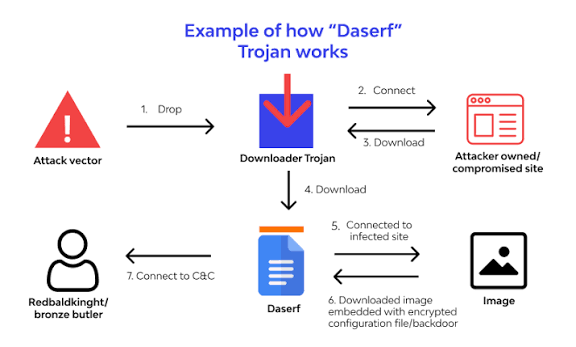
After installation, the Trojan may attempt to establish access to the system and communicate with an attacker-controlled server. Depending on the type of Trojan, the attacker may then steal information, monitor the device, install additional malware, or carry out other malicious activities.
Common Types of Trojan Malware
Trojans can perform different functions, which is why they are often classified according to their primary purpose.
Banking Trojans
Banking Trojans are designed to target financial information. They may attempt to steal online banking credentials, payment details, or other sensitive information.
These Trojans can be particularly dangerous because attackers may use stolen financial data to commit fraud or gain unauthorized access to financial accounts.
Remote Access Trojans
A Remote Access Trojan, commonly called a RAT, can give an attacker unauthorized control over an infected device. Depending on its capabilities, a RAT may allow attackers to access files, monitor activity, or perform actions remotely.
This type of Trojan can create serious privacy and security risks for both individuals and organizations.
Information-Stealing Trojans
Information-stealing Trojans focus on collecting valuable data from infected devices. They may target passwords, browser information, personal documents, authentication data, and other sensitive details.
Stolen information can later be used for identity theft, financial fraud, or additional cyberattacks.
Downloader Trojans
Downloader Trojans are primarily used to install additional malicious software. Once they gain access to a device, they may download ransomware, spyware, or other malware.
This means that a Trojan infection can sometimes be only the beginning of a much larger security problem.
Trojan Droppers
A dropper Trojan carries or installs other malicious components onto a system. Instead of focusing on one specific type of damage, it can help attackers introduce additional malware without immediately attracting attention.
Common Signs of a Trojan Attack
Recognizing a Trojan infection early can reduce potential damage. However, some Trojans are designed to remain hidden, so there may not always be obvious warning signs.
Possible symptoms include unusually slow device performance, unexplained crashes, unexpected applications, unfamiliar browser activity, or changes to system settings.
Users may also notice unusual network activity, unknown processes running in the background, or security software being disabled without permission.
Unexpected password changes or suspicious activity on online accounts can also be a warning sign that information may have been compromised.
It is important to remember that these symptoms can have legitimate causes as well. A professional security scan may be necessary to determine whether malware is actually present.
How Trojan Attacks Spread
Cybercriminals use several methods to distribute Trojans. Email phishing is one of the most common approaches. Attackers may send messages that appear to come from trusted companies, coworkers, financial institutions, or other organizations.
Malicious websites are another source. A website may encourage visitors to download a supposedly required program, update, or security tool that actually contains malware.
Trojans can also be distributed through pirated software, unauthorized applications, suspicious browser extensions, fake advertisements, and compromised websites.
Social media and messaging platforms can also be abused. Attackers may send links or files accompanied by messages designed to create urgency or curiosity.
How to Prevent Trojan Attacks
Preventing Trojan infections requires a combination of technology and good security habits.
First, download software only from trustworthy sources. Avoid suspicious websites offering modified, cracked, or pirated applications because these files can contain hidden malware.
Keep your operating system, applications, browsers, and security software updated. Security updates often fix vulnerabilities that attackers could otherwise exploit.
Be careful with unexpected emails and attachments. Even if a message appears to come from someone you know, verify the sender and context before opening an attachment or clicking a link.
Using reputable antivirus or endpoint security software can provide another layer of protection. Security tools can detect and block many known malicious files and suspicious activities.
Strong, unique passwords are also important. Using multi-factor authentication where available can make it harder for attackers to access accounts even if a password is stolen.
Regular backups are another important defense. Keeping secure backups of important files can help reduce the impact of a serious malware infection.
What to Do If You Suspect a Trojan Attack
If you believe your device may be infected, avoid ignoring the problem. Disconnecting the affected device from the internet can help prevent unauthorized communication while you investigate the situation.
Run a complete scan using trusted security software. If the software identifies a Trojan, follow its recommended removal process.
You should also consider changing important passwords from a separate, trusted device, particularly if you suspect that the infected computer may have exposed your credentials.
Monitor financial accounts and online services for unusual activity. If sensitive information may have been stolen, contact the relevant service provider or financial institution as soon as possible.
For business environments, a suspected Trojan infection should be reported to the organization’s IT or cybersecurity team. Professional investigation may be necessary to determine whether other devices or accounts have been affected.
Why Trojan Attacks Are Still a Serious Threat
Trojans remain dangerous because they take advantage of one of the weakest points in cybersecurity: human trust.
Even advanced security systems cannot eliminate every risk if users are persuaded to install malicious software themselves. Attackers continually create convincing messages, fake applications, and deceptive websites to make their campaigns appear legitimate.
The consequences can range from stolen passwords and personal information to financial losses, privacy violations, and wider network compromises.
For organizations, the risks can be even greater because one infected device may provide attackers with an opportunity to target additional systems.
Frequently Asked Questions
1. What is a Trojan attack?
A Trojan attack occurs when malicious software disguises itself as a legitimate file, application, or program to trick a user into installing or opening it. Once activated, the Trojan can perform harmful activities such as stealing information or providing unauthorized access.
2. How does a Trojan get onto a computer?
Trojans can reach computers through phishing emails, malicious attachments, fake software updates, pirated programs, suspicious websites, deceptive advertisements, and unsafe downloads. Attackers often rely on social engineering to convince users to interact with the malicious file.
3. Can a Trojan steal passwords?
Yes. Some Trojans are specifically designed to steal passwords and other authentication information. They may target information stored in browsers, monitor user activity, or capture credentials through other malicious techniques.
4. Can antivirus software remove a Trojan?
Reputable antivirus and security software can detect and remove many types of Trojan malware. However, no security tool detects every threat perfectly. Keeping security software updated and seeking professional assistance when necessary can improve protection.
5. Are smartphones vulnerable to Trojan attacks?
Yes. Smartphones can also be targeted by Trojan malware, particularly through malicious or unofficial applications, deceptive links, and fake updates. Users should install apps from trusted sources and keep their mobile operating systems updated.
6. What is the difference between a Trojan and a virus?
A Trojan typically disguises itself as legitimate software and relies on the victim to execute or install it. A traditional virus is generally designed to replicate by infecting other files or systems. Although both are forms of malware, their methods of operation can differ.
7. How can I protect my computer from Trojan attacks?
Use updated security software, keep your operating system and applications patched, avoid suspicious downloads, be cautious with email attachments and links, use strong passwords, enable multi-factor authentication, and maintain regular backups of important data.
8. What should I do if I think my computer has a Trojan?
Disconnect the affected device from the internet if appropriate, run a complete security scan, follow the security software’s removal instructions, and change important passwords using a trusted device. If the device belongs to a business or contains highly sensitive information, contact a qualified IT or cybersecurity professional.
Final Thoughts
Trojan attacks are a major cybersecurity threat because they hide malicious activity behind seemingly legitimate software, files, or messages. Once installed, a Trojan can potentially steal information, monitor activity, provide unauthorized access, or install additional malware.
The best defense is a combination of awareness, updated software, reliable security tools, careful downloading habits, strong authentication, and regular backups.
No single security measure can guarantee complete protection. However, recognizing suspicious behavior and understanding how Trojan malware operates can significantly reduce the chances of becoming a victim.