
The internet has made life easier in countless ways. We can work, shop, communicate, study, manage finances, and store important information online within just a few clicks. However, this convenience also comes with risks. One of the biggest threats facing internet users today is malware.
Malware is short for “malicious software,” and it is designed to harm devices, steal information, disrupt systems, or gain unauthorized access. From personal computers and smartphones to business networks, almost any internet-connected device can become a target.
This is where malware protection becomes essential. The right protection can help detect dangerous software, block suspicious activity, and keep your personal information and digital files safer.
What Is Malware?
Malware refers to any software intentionally created to damage a device, steal data, spy on users, or perform other harmful activities without proper permission.
There are several common types of malware. Viruses can attach themselves to legitimate files and spread when those files are opened. Trojans may look like useful programs while secretly carrying malicious code. Ransomware can lock files or systems and demand payment to restore access.
Other forms include spyware, which can secretly monitor user activity, and adware, which may display unwanted advertisements or redirect users to suspicious websites.
Although malware has existed for decades, modern threats have become much more sophisticated. Cybercriminals often use social engineering, fake websites, malicious attachments, and deceptive downloads to trick people into installing harmful software.
Why Is Malware Protection Important?
Many people assume that malware only affects large companies or people who visit unsafe websites. Unfortunately, that is not true. Anyone who uses the internet can potentially encounter malicious software.
A single infected file or deceptive link can create serious problems. Malware may steal passwords, access financial information, delete important files, or allow attackers to control parts of a device.
For businesses, the consequences can be even more serious. An infection can interrupt daily operations, expose customer information, and create expensive recovery and downtime costs.
Effective malware protection adds an important layer of security. It can continuously monitor a device and identify suspicious programs before they cause significant damage.
How Does Malware Protection Work?
Modern malware protection generally uses several security techniques rather than relying on one method.
One traditional approach is signature-based detection. Security software compares files against databases of known malicious programs. If a file matches a recognized threat, the software can block or quarantine it.
However, cybercriminals constantly create new versions of malware. For this reason, modern security tools also use behavioral detection. Instead of looking only for known threats, they monitor how programs behave. If an application suddenly attempts to modify system files, access sensitive information, or perform another suspicious action, the security software may flag it.
Some advanced solutions also use cloud-based analysis and machine learning to identify unusual patterns. This can help detect previously unknown threats that do not yet have a traditional malware signature.
Common Ways Malware Gets Onto a Device
Understanding how malware spreads is just as important as installing security software.
One common method is phishing. Attackers may send emails or messages that appear to come from legitimate organizations. These messages often encourage recipients to click a link, download an attachment, or provide sensitive information.
Malware can also be distributed through fake software updates. A pop-up may claim that a browser, media player, or another application needs an urgent update. Clicking the message can instead download malicious software.
Unsafe downloads are another major source of infections. Pirated programs, unofficial applications, suspicious browser extensions, and files from unknown websites can contain hidden threats.
Even legitimate websites can occasionally be compromised. This is why users should maintain security software and keep operating systems and applications updated.
Features to Look for in Malware Protection
Not every security solution provides the same level of protection. When choosing malware protection, it is useful to consider several features.
Real-Time Protection
Real-time scanning continuously monitors files, applications, downloads, and other activities. It can warn you when something suspicious is detected instead of waiting for you to perform a manual scan.
Automatic Updates
New malware appears regularly, so security software needs updated threat information. Automatic updates help ensure that the software can recognize newer threats.
Web Protection
Web protection can help block malicious websites, dangerous downloads, phishing pages, and other online threats before they reach your device.
Email Scanning
Because malicious attachments and phishing messages are common attack methods, email protection can provide an additional layer of security.
Quarantine and Removal
Good security software should not only identify malware but also provide options to isolate or remove it safely.
Scheduled Scanning
Scheduled scans allow users to check their devices automatically at regular intervals. This can be particularly useful for people who do not remember to run manual security checks.
Malware Protection for Businesses
Businesses need to take malware protection seriously because one infected device can sometimes affect an entire network.
Employees may unknowingly open a malicious attachment, visit a compromised website, or install unauthorized software. If the threat spreads across connected systems, the organization could face data loss and operational disruption.
Businesses should combine endpoint security with employee training, strong access controls, regular backups, and security policies.
Regular backups are particularly important against ransomware. If important files are safely backed up, an organization may have a recovery option without relying entirely on an attacker’s demands.
Companies should also keep software patched and limit administrative privileges. Employees should only have the access they need to perform their jobs.
How to Improve Your Malware Protection
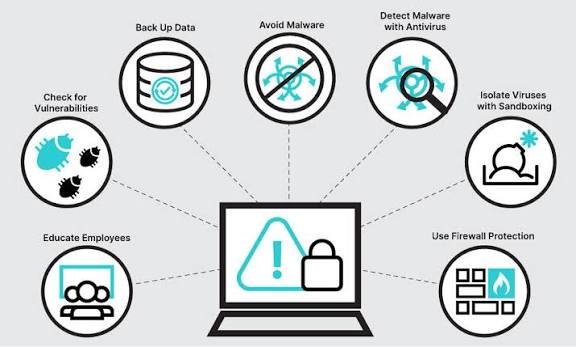
Security software is important, but it should not be your only defense. Safe online habits can significantly reduce your risk.
First, keep your operating system, browser, and applications updated. Software updates often include security fixes that address vulnerabilities attackers could exploit.
Second, be careful with links and attachments. If a message creates a sense of urgency or asks for sensitive information, verify it before taking action.
Third, download software only from trusted sources. Avoid unknown websites and unofficial versions of popular applications.
It is also important to use strong, unique passwords. Reusing the same password across multiple accounts can make it easier for attackers to access several services if one password is exposed. A password manager can make it easier to maintain different passwords for different accounts.
Multi-factor authentication is another useful security measure. Even if an attacker obtains your password, an additional authentication step can make unauthorized access more difficult.
Finally, maintain regular backups of important files. Ideally, backups should be stored separately from the primary device so that malware cannot easily affect both the original files and their backups.
What Should You Do If Malware Is Detected?
If your security software detects malware, do not ignore the warning. Follow the recommended instructions to quarantine or remove the threat.
If you believe your device has already been compromised, disconnecting it from the internet can help reduce the possibility of further unauthorized communication or spreading within a network.
Run a complete security scan and remove any identified threats. Afterward, update your operating system and security software.
If you entered passwords while the device may have been infected, consider changing those passwords from a trusted device. For sensitive accounts, such as banking or email, review recent activity and contact the relevant provider if you notice anything unusual.
For serious infections, especially those involving business systems or sensitive data, professional cybersecurity assistance may be appropriate.
The Future of Malware Protection
Cyber threats continue to evolve, and malware protection will need to evolve with them. Attackers are increasingly using automation and sophisticated social engineering techniques to make their campaigns more convincing.
Security providers are responding with technologies that analyze behavior, identify unusual activity, and respond to threats more quickly. Artificial intelligence and machine learning are also becoming increasingly important in cybersecurity.
However, technology alone cannot eliminate every risk. Human awareness remains a critical part of digital security. A person who recognizes a suspicious email or fake download page can prevent an attack before security software ever needs to intervene.
The strongest approach is therefore a combination of reliable security tools and responsible online behavior.
Frequently Asked Questions
1. What is malware protection?
Malware protection is a set of security tools and practices designed to detect, block, isolate, and remove malicious software. It can protect devices against threats such as viruses, ransomware, spyware, Trojans, and other harmful programs.
2. Is malware protection really necessary?
Yes. Any device connected to the internet can potentially encounter malware. Security software provides an additional layer of defense against malicious files, websites, downloads, and suspicious activity.
3. Can malware protection stop every virus?
No security solution can guarantee protection against every possible threat. However, updated malware protection can detect and block many known and emerging threats, especially when combined with safe browsing habits and regular software updates.
4. How can I protect my device from malware?
Keep your operating system and applications updated, use reputable security software, avoid suspicious links and attachments, download programs from trusted sources, use strong passwords, enable multi-factor authentication, and maintain regular backups.
5. What should I do if my device has malware?
Use your security software to quarantine or remove the detected threat and run a full system scan. If you suspect that sensitive information or accounts may have been compromised, change important passwords from a trusted device and consider getting professional cybersecurity assistance.
Final Thoughts
Malware is a serious digital threat, but users do not have to remain defenseless. Effective malware protection can help identify harmful software, block suspicious activity, and reduce the chances of data theft or system damage.
The best protection starts with reliable security software and continues with good online habits. Keep your devices updated, avoid suspicious links and downloads, use strong passwords, enable multi-factor authentication, and back up important information regularly.
Cybersecurity is not a one-time task. Threats change constantly, so protecting your digital life requires ongoing attention. By taking sensible precautions today, you can significantly improve the security of your devices, accounts, and personal information.